Justin Ward is a UX/UI Designer
  • User Research
  • F/E Development
  • Graphic Design
  • System Performance Auditing
  • Design Systems
  • Copy Writing
  • Testing
  • Design→Dev Handoff
  • Project File Structure/Management
  • Wireframing
  • Prototyping
and Creative Strategist focused on creating Human-Computer Interface solutions that go beyond visual appeal shaping meaningful and functional end-to-end user experiences.

Graphic Design

I specialize in both print and digital design with a special interest in branding, website design, typography and iconography.

Coming from many years of formal education and work experience with print foundries and physical print media, I put my understanding of the now-antiquated Press Design Principals (ex: leading, kerning, registry, bleed, color-sep, etc.) to use in the digital realm.

Check out some of the work I've done on Instagram.

Web Design & Development

As a web designer, with skill both on and behind the page, I create, render and code the aesthetics and functionality of a website completely from scratch; using as few plugins, grids, boilerplates or other third-party functions as possible.

This gives me the opportunity to customize elements as I see fit without fear of copyright claims, it reduces problems understanding previous spaghetti code, promotes the use of logical naming conventions (I like to use a hybrid of BEM and a version of Tailwind). I also like to make sure I'm using W3C valid markup and SEO best practices, which helps propel SEO rankings and make screen-readers more effective.

UX Design

From research to, wireframe, to mockup, to prototype, and to the final product -- I take into account all the different users' abilities and their intentions as well as the intent(s) of the website or app.

I design intuitive, inclusive, flexible and user-friendly environments that are a pleasure to interface with by first embarking on a pre-dev discovery of the product/service in question, then running through a gamut of exercises (ex: target audience/user behavior, competitive analysis, user personas, user scenario/journey, flowcharts and system models).

Marketing & SEO

I obtain user-data and develop strategies for marketing campaigns that directly complement the website, print materials, or other marketing peripherals.

Building websites from the bottom up, allows me to enlist SEO best practices (ex: semantic and intuitively structured HTML elements, 'alt/title' tags, ARIA properties, H1-H6 hierarchy, links/backlinks, and optimized images/partials/includes).

UR

User Research

From research to, wireframing, to mockup, to prototype, to final product -- I take into account all the different users' abilities and their intentions as well as the intent(s) of the website, app or project.

I design intuitive, flexible and user-friendly environments that are a pleasure to interface with by first embarking on a pre-dev discovery of the product/service in question, then running through a gamut of exercises (ex: target audience/user behavior, competitive analysis, user personas, user scenario/journey, flowcharts and system models).

Studies, Discoveries, Interviews, Usability Testing (internal/beta), Listening
CC

Collaboration & Communication

From research to, wireframe, to mockup, to prototype, to final product -- I take into account all the different users' abilities and their intentions as well as the intent(s) of the website, app or project.

I design intuitive, flexible and user-friendly environments that are a pleasure to interface with by first embarking on a pre-dev discovery of the product/service in question, then running through a gamut of exercises (ex: target audience/user behavior, competitive analysis, user personas, user scenario/journey, flowcharts and system models).

Working with all the different departments ex: SME, Dev, Marketing, Stakeholders, Designers, etc.
eXs

Experience Strategy

A concrete eXs ensures that everyone on the product team is moving towards solving the right problems and helping their users reach their goals.

Everyone rowing in the right direction!

Some other major benefits are:

  • It gets executives onboard.
  • It aligns business goals, user needs, and technological capabilities.
  • It gives clear metrics of success.
  • It creates a user-first mentality.
  • It connects all touchpoints.
IA

Information Architecture

IA is the organizing and structuring of the system's content so users can easily find information and complete desired tasks/functions.

Intuitively getting from A to B to C to...and back.

A well-planned IA is sure to increase efficiency by reducing potential usability and navigation (system flow) problems.

IxD

Interaction Design

A focus on all the assets the user interacts with, ex: animations, buttons and typography, from an Atomic and scalable perspective.

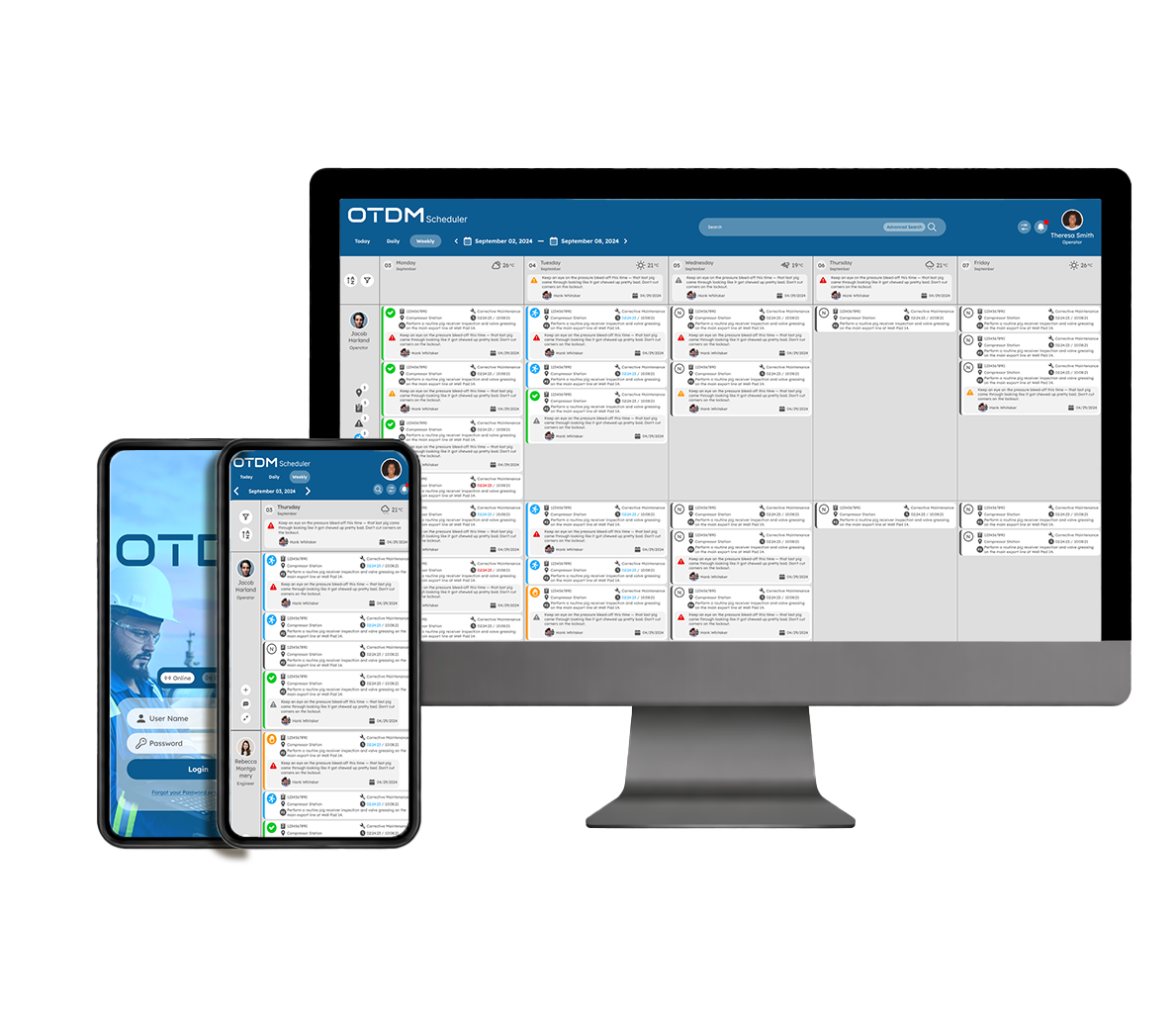
OTDMby Pengcorp

GUI/UX App Design
Graphic Design/Marketing

project intro image

Project Overview

The goal was to create a completely customizable Content and Asset Management System, as well as a comprehensive Planning and Schedule interface.

The different modules and services include, a CMMS/EAM (with GIS location-based component), a PTW Management System, MOC System, and a Maintenance Scheduling and Planning app.

With an already strong clientele, from all over the world, that managed their operations with industrial software like OSI Pi, Oracle, AVEVA, IBM Maximo and SAP, it was important to maintain the same overall structure and enterprise foundation, while modernizing functions and adding efficiency.

Toolkit

  • Figma

    I create wireframes, assets/components, system design packages, webscreens, (interactive) prototypes, animations and video showcases with Figma Figma Design.

  • Illustrator

    I create almost all system design assets like icons, all SVG elements, and entire brand identity with Adobe Illustrator.

  • Photoshop

    I render mockups, hi-res raster graphics and presentational materials with Adobe Photoshop.

  • Visual Studio Code

    I write completely custom HTML, CSS/SASS, JS, RegEx, PHP and some dabbling in React and Angular frameworks, using Microsoft Visual Studio as my IDE.

  • Atlassian

    I coordinate and share assets, bugs and project events/tasks with my team through The Atlassian software collaboration suite.

Understanding

This is a highly complex platform that acts as not only a graphical interface for SCADA information, but also a robust properitary content management and planning system.

The Users of this app range from every level of hierachy within a company in the Oil & Gas sector.

  • Maintenance Technicians: Using CMMS to create/close work orders, access asset history, log findings, and update asset conditions in the field.
  • Maintenance Planners / Schedulers: Using CMMS and Scheduling apps to plan jobs, prepare materials, estimate time, and optimize maintenance schedules.
  • Reliability Engineers: Using CMMS for failure analysis, MTBF tracking, predictive maintenance data, and identifying bad actor assets.
  • Asset Managers / Plant Managers: Using CMMS and Asset Management dashboards to monitor asset performance, costs, risks, and overall facility health.
  • Operations Supervisors: Using PTW to issue permits, CMMS to review work orders, and Scheduling apps to coordinate maintenance windows with production.
  • HSE / Safety Officers: Using PTW systems to issue, audit, and close permits while ensuring safety compliance and risk controls.
  • Process Safety Engineers & MOC Coordinators: Using MOC systems to initiate, review, and approve changes with proper hazard analysis and documentation.
  • Project / Discipline Engineers: Using MOC to manage technical changes and CMMS to access asset data and update records after modifications.
  • Asset Integrity / Inspection Engineers: Using CMMS to plan and track inspections, corrosion data, and ensure equipment fitness for service.
  • Turnaround / Shutdown Planners: Using Scheduling apps and CMMS to scope, plan, and coordinate large-scale maintenance outages.

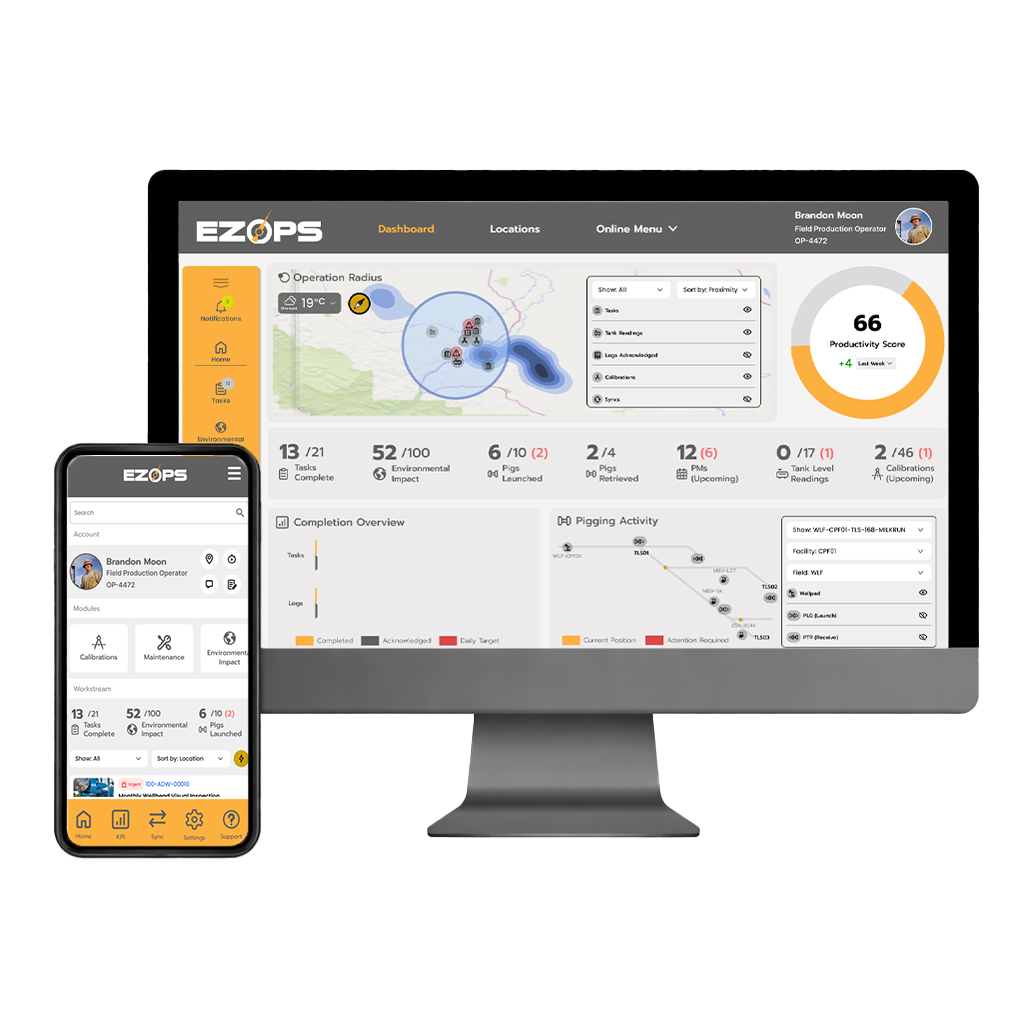
EZOPS
Optimization

GUI/UX App Design
FE Development

project intro image

Project Overview

The goal was to create a digital platform that could aggregate a field operator's tasks and streamline their completion, while providing as much efficiency as possible and reducing the need for antiquated manual notes, logs and reports.

The project came at a time when physical distancing was a key priority and an emphasis was placed on digitilization and the ability to conduct work and accomplish tasks remotely.

This prompted the creation of an entire Design System including 50+ icons, reusable UI components and assets, typographical and layout design/style guides.
Due to a small team size, I was also responsible for a large portion of Front End coding.

Toolkit

  • Figma

    I create wireframes, assets/components, system design packages, webscreens, (interactive) prototypes, animations and video showcases with Figma Figma Design.

  • Illustrator

    I create almost all system design assets like icons, all SVG elements, and entire brand identity with Adobe Illustrator.

  • Photoshop

    I render mockups, hi-res raster graphics and presentational materials with Adobe Photoshop.

  • Visual Studio Code

    I write completely custom HTML, CSS/SASS, JS, RegEx, PHP and some dabbling in React and Angular frameworks, using Microsoft Visual Studio as my IDE.

  • Atlassian

    I coordinate and share assets, bugs and project events/tasks with my team through The Atlassian software collaboration suite.

Understanding

The User is a Oil and Gas Field Operator with a focus on Production Operations like Pigging, Catadyne monitoring and simple Maintenance tasks.

A Maintenance Planner and Operations Coordinator assigns tasks directly to a worker or they are routinely and automatically produced by a SCADA systems

From the app a User can:

  • View all tasks assigned to them and either personally order/sort said tasks or utilize the "Smart Sort" feature; allowing AI to create the most optimal order, while respecting EZOP's customizable prioritization algorithmn.
  • Dig into the important details of each task (ie. Location, Deadline, Equipent involved, etc)
  • Post and view photos pertaining to a task.
  • Add notes.
  • Attach pertinent files like a Completion Checklist, videos or manuals.
  • See all the relevant historical data (who, what, why, where).
  • Communicate with the Planner, GF or other persons associated to the task via a chat message system.
  • Each module displays relevant data and KPIs.
  • Home page acts as your main User dashboard presenting a GPS map of tasks and sensors and a visual representation of all important data.

Plenty of time was invested researching, interviewing technicians, going on job-shadows in refineries and learning which data to capture and how to display it in the most meaningful and helpful ways.

FitFare

GUI/UX App Design

project intro image

Project Overview

The main goal was to create something incredibly simple that allowed for flexibility and customization. The User inputs their personal information as well as likes, dislikes, allergies, dietary goals, and from that information, a list of meals are suggested.

There's also a supply and shipping management component -- allowing users to reuse food containers and easily schedule delivery, pick-ups and drop-offs.

Toolkit

  • Experience Design

    I create wireframes, site/app components, system design packages, webscreens, (interactive) prototypes, animations and video showcases with Adobe Experience Design.

  • Illustrator

    I create almost all system design assets, all SVG elements, and entire brand identity with Adobe Illustrator.

  • Photoshop

    I render mockups, hi-res raster graphics and presentational materials with Adobe Photoshop.

  • Visual Studio Code

    I write completely custom HTML, CSS/SASS, JS, RegEx, PHP and some dabbling in React and Angular frameworks, using Microsoft Visual Studio as my IDE.

  • Whimsical

    I share all my flows, diagrams and wireframes, with my team, stakeholders and clients over the Whimsical.com all-in-one collaboration hub.

Analyze &
Research

I define the problem(s) the app is looking to solve, based on the client's Project Brief and by conducting a series of interviews, surveys and competitive analysis/research.

I then gather up all my notes and data, and sort it into an Affinity Diagram.

Next, based on the data and the Users' needs and wants, I sketch out a basic System Model.

Interview Questions

project step2

Affinity Diagram/Cards

project step2

User Journey

I create different User Personas, ranging in likes, proficiencies and other important characteristics I use to empathize with the User.

I run through the main touchpoints of the app; spotlighting the potentential painpoints and hurdles along the journey, outlined in the User Scenarios script.

For this design, I specifically targeted the Login Screen, User Profile, Meal Selection and Checkout points.

User Personas

project step1

User Journey

UI Design

With all that information collected and sorted, I can begin designing the User Flow Diagram and overall User Interface through a series of low-fidelity Basic Wireframes.

Now that I have a high-level look at how the user interacts with our model, I can iterate through different screens/wireframes.

User Flow Chart

project step3

Wireframes

After scutinizing over the User's Journey and throwing as many variables and alternate navigation routes (not just the ideal path) at it, I'll iterate through each milestone screen, as well as, the subsequent screens and how they're interacted with.

I like to include a short and brief narrative of the user's journey and intentions, so the development team is all that much more comfortable with the functionality.

Prototype

Lastly comes the fun part!
After myself, the team, some Users and the Stakeholders have thrown in their 2-cents and approved the proposed flow of the interface, I can put my graphical touches on it and present it as hi-fidelity mockups and even a demo video to be pitched.

Interactive prototypes and static mockups are handed off to the development team and used as blue prints to bring it to life.

Hi-fi Mockups

Spotless
VIP Cleaning

GUI/UI App Design

project intro image

Project Overview

The goal here was to create a process for the customer to submit a request for a residential cleaning service and have the business schedule said request with no need for further confirmation or information. It was critical that we gather all pertinent information, from the client, in order to respond with the most accurate estimate as possible.

Prior to this, the client would have to rely on phone calls, to ensure all the important information was shared before providing an accurate estimate on duration, difficulty, frequency, cost and tools required for the cleaning service.

This project had to pivot from a stand-alone application, to a web form design, due to budgetary complications.

All the information gathered during R&D was still absolutely relevant.

Toolkit

  • Experience Design

    I create wireframes, site/app components, system design packages, webscreens, (interactive) prototypes, animations and video showcases with Adobe Experience Design.

  • Illustrator

    I create almost all system design assets, all SVG elements, and entire brand identity with Adobe Illustrator.

  • Visual Studio Code

    I write completely custom HTML, CSS/SASS, JS, RegEx, PHP and some dabbling in React and Angular frameworks, using Microsoft Visual Studio as my IDE.

  • Whimsical

    I share all my flows, diagrams and wireframes, with my team, stakeholders and clients over the Whimsical.com all-in-one collaboration hub.

  • Typeform Survey

    I conduct customer and client surveys to gather crucial information that help inform the User Journey and the overall User Experience, with Typeform.com, for surveying and link-sharing

Analyze/Research

When a project involves a B2C (Business To Customer) service, I like to look at it from an "Ins n' Outs" perspective; the inputs given by the user, and the outputs required by the business.

My interview questions are posed to both sides and Affinity card sorting reflects both perspectives.

System Diagram

project step2

User Personas & Journey Card Sort

I like to go through the User's Journey and sort the cards by actions taken at all the major touchpoints througout the journey; through the eyes each of the Personas created.

I then sort the cards by:

  • Obligatory Steps (madatory actions or processes)
  • Painpoints (actions or influences causing User grief/hangups)
  • Opportunities (ideas or "nice-to-haves" not necessarily pertinent to that particular touchpoint

User Personas

project step1 project step1

User Journey

UI Design

With all that information collected and sorted, I can begin designing the User Flow Chart and general User Interface through a series of low-fidelity Basic Wireframes.

Now that I have a high-level look at how the user interacts with our model, I can iterate through different screens/wireframes.

User Flow Chart

project step3

Wireframes

After scutinizing over the User's Journey -- card sort and throwing as many variables and alternate navigation routes (not just the ideal path) at it, I'll iterate through each milestone screen, as well as, the subsequent screens and how they're interacted with.

I like to include a short and brief narrative of the user's journey and intentions, so the development team is all that much more comfortable with the functionality.

User/Customer View

project step3

Staff/Admin View

project step3

Prototype

Lastly comes the fun part!
After myself, the team, some Users and the Stakeholders have thrown in their 2-cents and approved the proposed flow of the interface, I can put my graphical touches on it and present it as hi-fidelity mockups and even a demo video to be pitched.

Interactive prototypes and static mockups are handed off to the development team and used as blue prints to bring it to life.

Hi-fi Mockups (customer)

Hi-fi Mockups (staff/admin)

OutTheBox

GUI/UX/FE Development
Graphic Design/Branding

project intro image

Project Overview

This project had to provide the ability for clients of OTB to launch a "support ticket" and request assistance (notified via SMS), as well as, integrate React eCommerce.

Toolkit

  • Experience Design

  • Illustrator

  • Photoshop

  • React

  • Firebase

  • Visual Studio Code

Systics

GUI/UX/Web Design
Graphic Design/Branding

View Details
project intro image

Project Overview

This client required a website that would serve as an advertisement for their business, a place to obtain information (via a blog) as well as, be the main hub and login mechanism for Systic's employees to reach their company's newsfeed and important work-related communications (via intranet).

A simple blog was created with the Storyblok API in a React project structure.
The newsfeed and communication line is essentially a link to a Bitrix intranet workspace.

Toolkit

  • Illustrator

  • Photoshop

  • Experience Design

  • React

  • Storyblok

  • Visual Studio Code

  • Whimsical

Special Forces
Pension Plan

GUI/UX/Web Design
Graphic Design

project intro image

Project Overview

Alberta Pension Services required a completely custom designed (frontend/backend) CMS for the handling of secure financial data, while presenting important information and how-tos to the public, via infographics and interface design work.

Their services branched over 4 sectors that each required its own interface. I led the design and development for Special Forces and Local Authorities.

Visit Site

Toolkit

  • Angular

  • Miro

  • Illustrator

  • Photoshop

  • Visual Studio Code

  • Git

  • Node Package Manager

Branding & Identity

Using my graphic design skills, I specialize in creating logos for brands and businesses.
I use all sorts of techniques and know-how to represent the heart and soul of the brand in a precise, printer-friendly, legible and timeless design.

Websites & GUI

I design Graphical User Interfaces for a multitude of different devices and mediums; from websites, to native applications, to web apps. Each consisting of a Style Guide, Design Tokens/Assets, User Flows/Journeys, Pattern Library and anything to help communicate the design to the rest of the team.

About Me

I’m an award-winning Graphic Designer. A highly skilled Web Designer. GUI/UX Designer. A Front-End Developer. A talented Print Designer and, most importantly, a Creative Problem Solver.

I've worked in Marketing & Advertising, O&G Industry, IT Field, Retail, Security, been mentored by and learned from some of the best in their respective industries.

I've been employed by government agencies, giant global companies, marketing firms, private artists, and more.

On each project I embark on, I create relationships with both designers, product owners and stakeholders to ensure best design and development practices are met.

I approach my design work with a focus on people and system efficiency; empathizing with the users of the products and services I help bring to life.

User Research & Synthesis
conducting studies, interviews, usability testing, sense-making
69%
Interaction & Information Architecture Design
flows, navigation, task modeling, structuring complexity
69%
Prototyping & Rapid Iteration
Figma, high-/low-fidelity prototypes, concept validation
69%
Cross-Functional Collaboration & Communication
working with PM, Eng, Data, Marketing, DevOps, etc.
66%
Product Thinking & Problem Framing
Defining constraints, understanding business and user value
66%
Usability, Accessibility & HCI Principles
WCAG, heuristic evaluation, cognitive load reduction
66%
- Justin Ward

Contact

If you have any questions, concerns or want to contact me regarding a project or job, please do so by filling out this contact form.

Feel free to browse or contact me through any of these other online social media and sharing communities.

If you've been given the password, please download my resumė.


Enter password to view/download resumé.


All work displayed on this portfolio website by Justin Ward (jwarddesign.ca) is presented for professional showcase purposes only. Certain projects, trademarks, logos, and brand assets remain the property of their respective companies or clients, while additional undisclosed work is protected under non-disclosure agreements (NDAs) and cannot be publicly displayed or shared.

Design Form

Look and Feel of Design

Minimal Complex
Modern Classic
Playful Serious
Loud Subtle
Luxury Moderate